
The Accessibility Issue
February 2026

This is the story of the effort to make Pipi fully accessible to all who need it. The steps taken have been part of Pipi’s development since 2005, spanning 5 versions.
The NZERN Pipi 2003-2005 Development Plan started it all.
Pipi 4 (2005-2008)
The story starts with Pipi 4. It was a big, successful system that supported community-driven Ecological Restoration in NZ. Here is a history of that Pipi version.
During that time, New Zealand (NZ) had dial-up modems. Many NZERN members were working farmers in rural areas, with very slow internet. Many were older with low computer literacy. This was a major factor determining what was possible. Web page sizes had to be kept under 16kb.
Recently, an archive of Pipi 4 help documentation was discovered and is now available for viewing. It is incomplete, but it gives an idea of how it worked.
Here is the description taken from the Pipi 4 Help archive. The Screen Reader Edition was designed for the blind members of NZERN by their family members.
PIPI4 is available in four editions to meet the needs of different groups of NZERN members.
Basic Edition
Designed for the novice computer user who wants a simple cut-down system, with instructions built into every step.
Skill level required: Capable of using a simple program like Outlook Express
Availability: All members of NZERN
Standard Edition
Designed for the confident computer user who wants a system with help available with one click. The user can ask questions and report bugs to the help desk.
Skill level required: Capable of using a program like Microsoft Word
Availability: All members of NZERN
Screen Reader Edition
Designed for the confident computer user who uses a screen reader and wants help available with one click. The user can ask questions and report bugs to the help desk.
Skill level required: Capable of using a program like Microsoft Word
Availability: All members of NZERN
Professional Edition
Designed for the expert computer user capable of self-learning, who wants a fast system with detailed technical documentation available with one click. The user will provide support to other members as a member of the help desk.
Skill level required: Capable of using an advanced program like Adobe Photoshop
Availability: All members of the help desk
Pipi 6 (2017-2019)
When Pipi was rebuilt from memory, some work was done to prepare for a more modular, standardised model-driven User Interface (UI) approach. Metadata was added to every database table to enable future personalisation and meet accessibility requirements.
Pipi 7 (2020)
Small, simple, static HTML mockups of workspaces were created as experiments.
Pipi 8 (2021-2022)
System-wide namespaces were implemented to enable future complex automated interactions.
Pipi 9 (2023-)
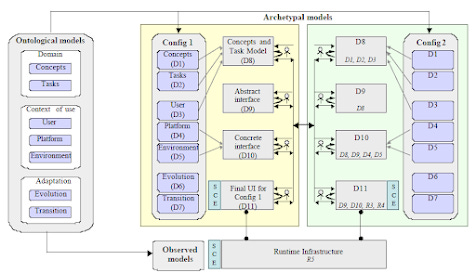
In 2003, a year-long investigation into model-driven interfaces led to the reuse and hacking of several abandoned EU research efforts in Human-Computer Interaction (HCI).
Putting a User Interface (UI) on the front end of Pipi 9 was challenging. It had to be
Model-driven
Adaptive to the users’ devices
Automated
Meet the individual needs of each logged-on user
Resources used
OMG Interaction Flow Modelling Language (IFML)
The CAMELEON References Framework (CRF)
User Interface Description Language (UIDL)
W3C Model-based UI Incubator
Model-driven UI
The User Interface Description Language (UIDL) was an EU-funded project that was abandoned in 2010 after 10 years of excellent work. It was to enable accessibility on different screens and devices. The research results were reverse-engineered to build a User Interface Engine (usi) that would run in reverse to generate accessibility solutions for Pipi. The CSS Engine (css) replaced some redundant components of the UIDL project. Additional engines for localisation and personalisation were created.
UK Design System
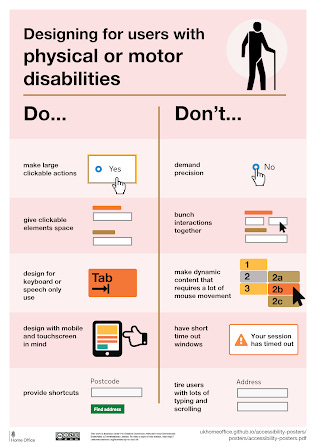
The UK Government has created a design system for building accessible websites. It includes many templates, components, tools, code, and guidance on achieving this. An excellent resource.
Example
A teaching customer
Mr G, my coach from Startup Aotearoa, suggested finding a first customer who could be a teaching customer. What a good idea.
As it happens, a new disability rights organisation emerged in response to funding cuts by the NZ government. The group led a national campaign that resulted in the Minister responsible losing her job and the scale of the cuts being reduced. The group had no money and needed a large campaign website that was highly accessible for deaf and blind people. Helping lead this campaign and building the website were deep learning experiences for me.
Pipi CMS Engine (cms)
A decision was made early on to autogenerate a separate website for each language (English, Māori, NZ Sign Language, and AAC picture language). This was the simplest solution for the CMS and the users.
Creating UI for each natural language, including sign languages (i18n), requires user requests and volunteer testers.
The CMS uses a template engine that builds web pages from reusable components. This means that getting CCS correct only needs to be done once for each component, and so on.
Sign Language
The scheme was dreamed up to embed NZ Relay Video Interpreting onto any webpage. This is an ongoing experiment, driven by deaf people.
Blind and Low Vision
This didn’t get far because blind people in NZ were needed to volunteer to help with testing. However, there are volunteers in other countries. This job depends on ongoing work on the CSS Engine (css). A particular challenge is catering for braille machines.
Picture Language
Professor Stephen Hawking used AAC via a computer-generated voice. There are many forms of AAC, including picture language. Providing this as a UI is being explored, with other AAC to follow. Important for the millions of people with Cerebral Palsy and Motor Neurone Disease.
Workspace personalisation
The workspace settings will offer complete personalisation of the UI. Similar in purpose to the wonderful AccessWidget from Accessibe.com. Instead of a pop-up, it will use a personalisation form in account settings.
Keeping it simple
On paper, WAI-ARIA looks great. However, the reality is that the growing interactive complexity of websites and differences in how browsers work mean that web pages break for people using assistive technology.
Modern websites present a large attack surface, making them vulnerable. Pipi’s solution is to focus on functionality, usability, and maximum simplicity. Small page sizes (Kb), semantic structure, and minimising JavaScript use.
https://www.blog.ajabbi.com/2024/06/aria-and-design-systems.html
https://www.blog.ajabbi.com/2025/02/creating-accessible-websites-using-web.html
https://www.blog.ajabbi.com/2024/11/alt-text-what-to-write.html
Standards
The W3C Web Content Accessibility Guidelines (WCAG) sets the international standard for providing full accessibility. Pipi will endeavour to meet WAIG 2.2 as a new conformance target for all languages.
Whats next
Designing the workspaces has made accessibility through personalisation a top requirement. The ongoing workspace rollout in 2026 will include further accessibility testing.
Thanks
The most useful and inspiring resource has been Smashing Magazine’s weekly newsletter, which often covers accessible UI design in great depth.
Dedication
Those who have fought all their lives for a world where people with disabilities have equal rights and can fully participate without barriers to the extent they are capable.